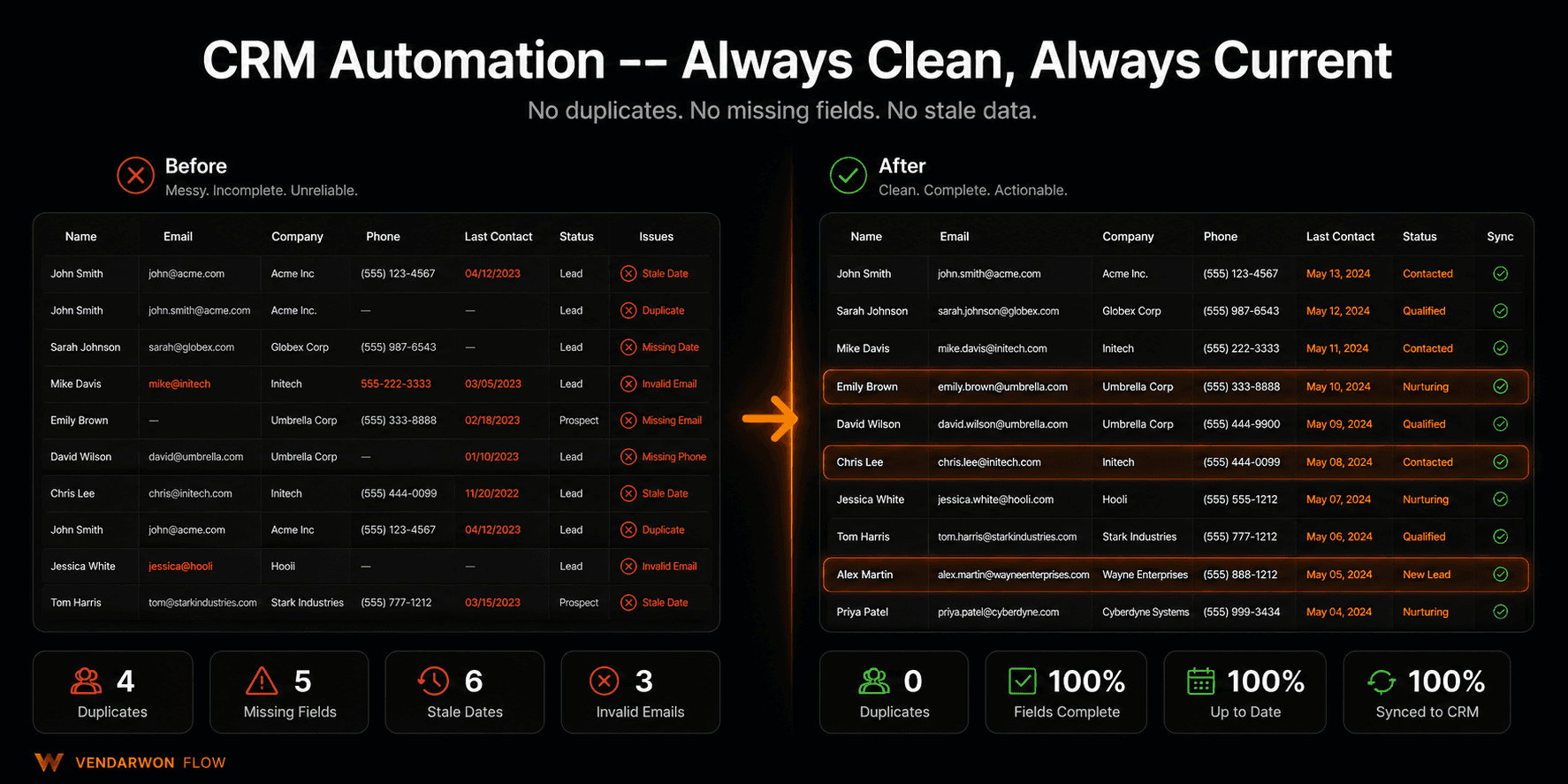
A CRM is only as useful as the data inside it. The problem is that keeping that data clean, complete, and current requires constant manual effort — effort that most sales teams simply don't have time for. Duplicate contacts pile up, fields get left blank, deals go stale, and follow-up reminders never get set. CRM automation fixes all four of these problems without asking your reps to change their behavior.
The 4 biggest CRM data problems
Problem 1: Duplicate contacts
Duplicates are the most destructive CRM data problem. When the same person exists twice in your system — once as “John Smith” from a form submission and once as “J. Smith” from a business card scan — your activity history splits across both records, follow-up sequences fire twice, and reporting becomes unreliable.
Automation fix: Every time a new contact is created, a workflow checks for existing records with matching email, phone, or company name. If a match is found, it merges the records automatically or flags the duplicate for rep review rather than creating a second entry.
Problem 2: Missing fields
Contacts with blank company size, industry, or job title fields can't be properly segmented, scored, or reported on. Reps skip these fields under time pressure — and the data gap compounds over time.
Automation fix:An enrichment workflow runs whenever a new contact is created. An HTTP Request node calls an enrichment API (Clearbit, Apollo, or Hunter) with the contact's email domain and fills in company name, size, industry, LinkedIn URL, and job title automatically. No rep involvement required.
Problem 3: Stale deals
Deals that haven't moved in 14, 30, or 60 days are costing you time without showing progress. Most CRMs let these sit indefinitely, clogging the pipeline view and distorting revenue forecasts.
Automation fix:A scheduled workflow runs daily, checks every open deal for last activity date, and flags deals with no movement in the past 21 days. The rep receives a Slack alert: “Deal [name] hasn't moved in 21 days. Update stage or close as lost?” With one click they can update from Slack. Deals that aren't updated within 7 days get automatically moved to a “Stale” stage so the pipeline view stays accurate.
Problem 4: Missing follow-up reminders
After a discovery call, the rep means to follow up in 3 days. They don't create a task in the CRM. Three days later, the lead is wondering why they haven't heard back. This scenario accounts for a significant portion of lost B2B deals.
Automation fix: When a meeting is logged (via calendar integration) or a call is completed (via dialer integration), a workflow automatically creates a follow-up task due in 2 business days and assigns it to the meeting owner. The task includes the meeting notes and suggested next steps generated by an AI node.
Before and after: CRM automation impact
| Area | Before automation | After automation |
|---|---|---|
| Duplicate contacts | 15–25% of records | <1% (auto-detected at entry) |
| Contact field completion | 45–60% | 85–95% (enrichment runs automatically) |
| Stale deals in pipeline | 20–35% of open deals | <5% (flagged and resolved weekly) |
| Follow-ups missed | ~30% of post-meeting follow-ups | ~2% (task auto-created after every meeting) |
| Rep time on CRM admin | 1.5–2.5 hrs/day | 20–30 min/day |
Activity logging automation
Manual activity logging is one of the most universally hated CRM tasks. After every call, email, or meeting, reps are expected to write up a summary and log it to the deal record. In practice, this gets skipped or done hours later from memory.
Modern automation options:
- Email auto-log: Any email sent from or received in the rep's Gmail account that matches a CRM contact is automatically logged to that contact's activity timeline
- Call transcription: Calls recorded via a dialer tool are transcribed by AI, and the summary is posted to the CRM deal record automatically
- Meeting notes: When a Google Calendar event ends, a workflow triggers an AI node that generates suggested call notes from the meeting title and attendees, sends them to the rep for a 30-second review, and logs them to the CRM
Pipeline reporting automation
Weekly pipeline reviews require someone to manually export CRM data, build a report, and email it to leadership. This takes 60–90 minutes and is often inaccurate by the time it's read.
A scheduled Vendarwon Flow workflow runs every Friday at 4pm, pulls deal data from HubSpot via API, formats a pipeline summary (deals by stage, new this week, closed this week, at-risk deals), and emails it to the sales manager. The entire report is generated and delivered automatically with zero manual involvement.
Connecting HubSpot, Pipedrive, and Close CRM
Vendarwon Flow has native integrations with HubSpot, Pipedrive, and Close CRM — covering the most common B2B CRM stack. Each integration supports creating contacts, updating deals, logging activities, reading contact properties, and triggering workflows from CRM events.
You can build cross-CRM workflows too — if your marketing team uses HubSpot and your sales team uses Pipedrive, a workflow can sync qualified leads from HubSpot into Pipedrive automatically, with the full contact record and history.
Keep your CRM clean automatically
Build duplicate detection, enrichment, stale deal alerts, and activity logging workflows on Vendarwon Flow. Connect HubSpot, Pipedrive, or Close CRM in minutes — free plan available.
Start building →