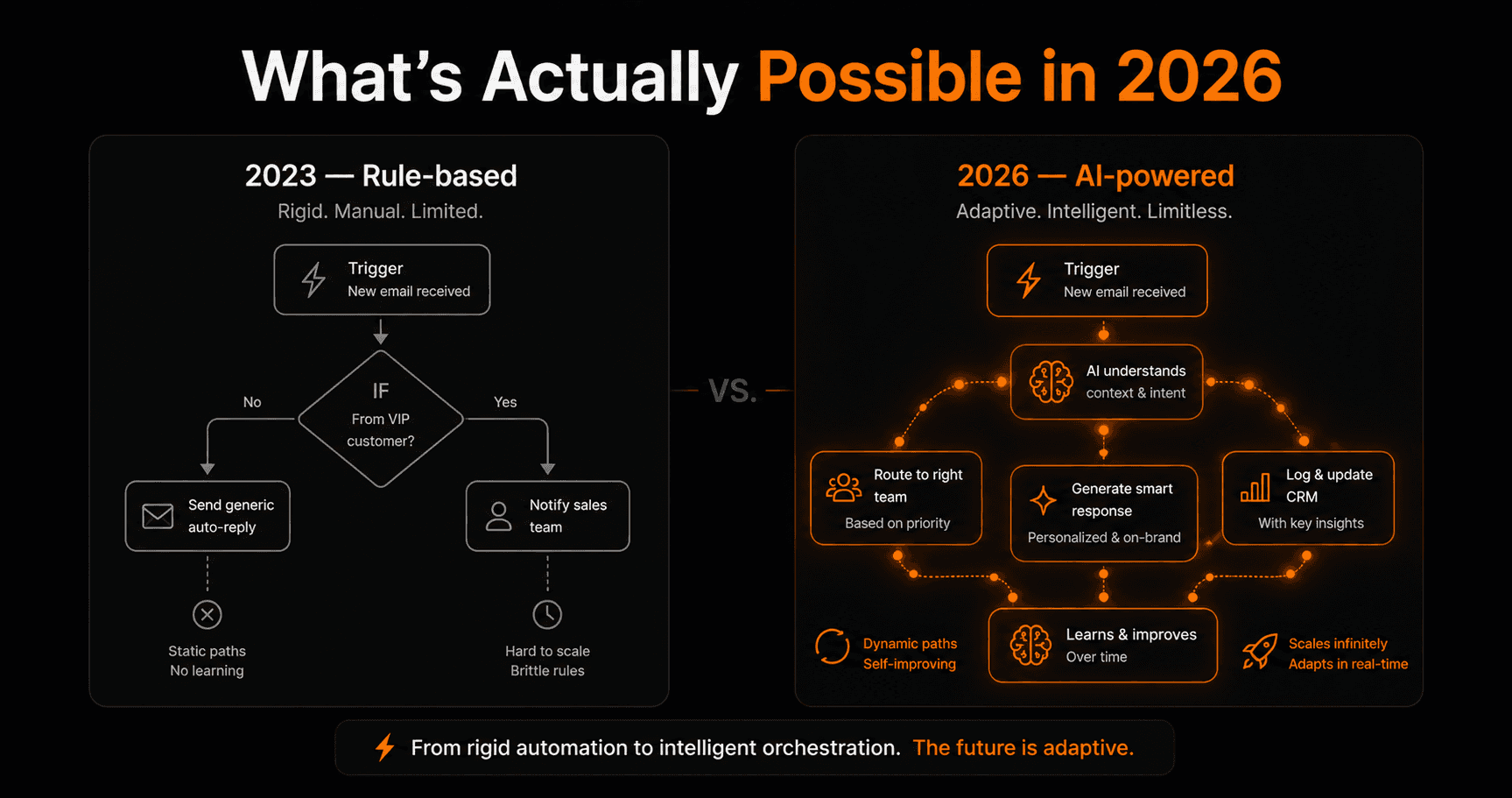
AI workflow automation has been hyped beyond recognition — and also underestimated in the areas that matter most. Here's a clear-eyed look at what AI can genuinely automate today, what it still can't, and what the next 12 months will unlock.
The shift from rule-based to AI-powered
Automation before 2024 was rigid. You defined every rule, every condition, every path. If X then Y. Always. It was powerful for predictable, structured processes — but useless anywhere human judgment was needed.
AI changes the automation equation entirely. Instead of encoding every rule yourself, you give the system a goal and it reasons about how to achieve it. Instead of if/then logic, you get understanding, judgment, and adaptation.
What AI workflow automation can do today
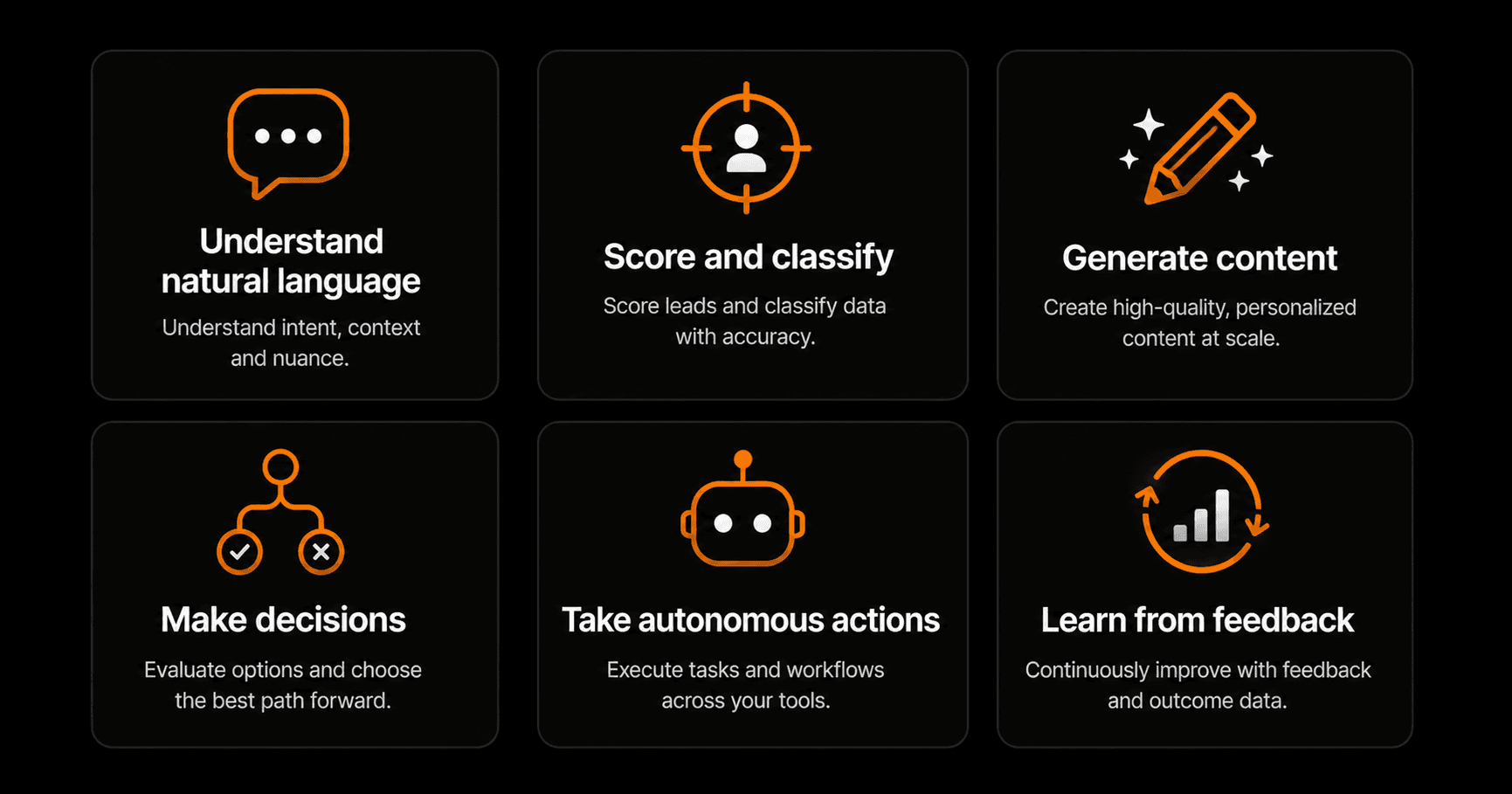
Six core capabilities that define what AI automation can do in 2026.
1. Understand natural language
AI workflows can read and genuinely understand emails, support tickets, form submissions, chat messages, and documents — extracting intent, sentiment, key entities, and structured data from unstructured text. This alone unlocks an enormous class of automation that was impossible with rule-based tools.
2. Score and classify
Lead scoring, support ticket priority, content moderation, fraud signals, sentiment analysis — all handled by AI nodes that return structured outputs your workflow can act on. Accuracy on well-prompted classification tasks regularly exceeds 90%.
3. Generate content
Personalised emails, meeting summaries, first-draft blog posts, product descriptions, weekly reports, Slack updates — all generated automatically at scale. Quality has improved to the point where AI-generated first drafts require minimal editing for most business use cases.
4. Make decisions
Beyond binary conditions, AI can weigh multiple signals and recommend a course of action — or just take it. Route this ticket to tier-2. Flag this transaction for review. Approve this expense. The judgment is probabilistic, not certain, but for most business decisions the accuracy is sufficient.
5. Take autonomous actions
AI agents can execute sequences of tool calls — search the web, read a page, update a CRM, send an email, book a meeting — without human input at each step. The bottleneck is no longer “can AI do this?” but “how much autonomy are you comfortable giving it?”
6. Learn from feedback
Through persistent memory and feedback loops, AI workflows can improve over time. An agent that scores leads can learn which scores turned into customers and adjust its criteria. A content agent can learn your preferred tone from edits you make to its drafts.
What AI workflow automation still can't do reliably
Being honest matters here. There are real limitations:
- Long-horizon planning. Tasks that require weeks of context, strategic thinking across many variables, or genuine creativity still need humans. AI executes well; it doesn't strategise.
- High-stakes irreversible decisions. Firing an employee, cancelling a contract, making a legal commitment — these need humans in the loop, not because AI can't reason about them, but because accountability matters.
- Tasks with no structure. If the input is completely unpredictable and there's no pattern to learn from, AI struggles. Novel situations outside training distribution produce unreliable results.
- Real-time physical interaction. Anything requiring physical presence or real-time sensory feedback is out of scope for software-based AI workflows.
- Consistency across very long chains. In a 20-step pipeline, accumulated errors and context drift can degrade output quality. Design pipelines with checkpoints and keep individual agents focused.
The highest-ROI AI automations in 2026
Based on adoption across thousands of businesses, these are the AI workflow automations delivering the most measurable ROI right now:
- Email triage and routing — saves 45–90 minutes per person per day
- Lead scoring and qualification — reduces sales team time on low-quality leads by 60–70%
- First-draft content generation — cuts content production time by 50–70%
- Support ticket classification and response — handles 40–60% of tier-1 tickets without human involvement
- Meeting notes and CRM updates — eliminates 15–30 minutes of post-meeting admin per meeting
- Weekly report generation — turns 2 hours of manual data compilation into a 2-minute automated run
Where AI automation is heading in the next 12 months
The trend lines are clear: agents are getting more capable, more reliable, and cheaper to run. Three things to watch:
- Computer use at scale. AI agents that can navigate any website or desktop app without requiring an API. This makes automation possible for any software — even legacy tools with no integration.
- Voice-activated workflows. Describing and managing automations by voice, not just text. Driving workflow creation down to truly zero friction.
- Self-improving pipelines. Workflows that analyse their own performance, identify failure points, and suggest (or implement) improvements without human intervention.
How to get started today
The gap between what's possible and what most businesses are actually doing is enormous. Most teams are still doing manually what could be automated in an afternoon.
Start with one process where you spend significant time on repetitive work that involves reading or writing text. That's where AI automation delivers immediately. Build one workflow, measure the time saved, and let that momentum carry you to the next one.
Frequently asked questions
Is AI workflow automation reliable enough for production use?
Yes for most business automation use cases. For high-stakes or irreversible actions, add human approval checkpoints. For the vast majority of repetitive knowledge work — routing, classifying, drafting, logging — AI automation runs reliably at production scale today.
How much does AI workflow automation cost?
On Vendarwon Flow, AI nodes are included on all plans at no extra charge. The cost is your plan subscription — starting free, then $9/month for 2,000 executions. Enterprise LLM API costs are absorbed by the platform.
Do I need technical skills to build AI workflows?
Not on Vendarwon Flow. You describe the workflow in plain English and AI builds it. The only skill required is knowing what you want to automate.
How do I know if my process is a good candidate for AI automation?
Ask: does this task involve reading text, making a judgment, or writing something? If yes, it's almost certainly a good candidate for AI automation. If the task involves purely structured data with fixed rules, regular workflow automation (without AI) may be sufficient and cheaper.