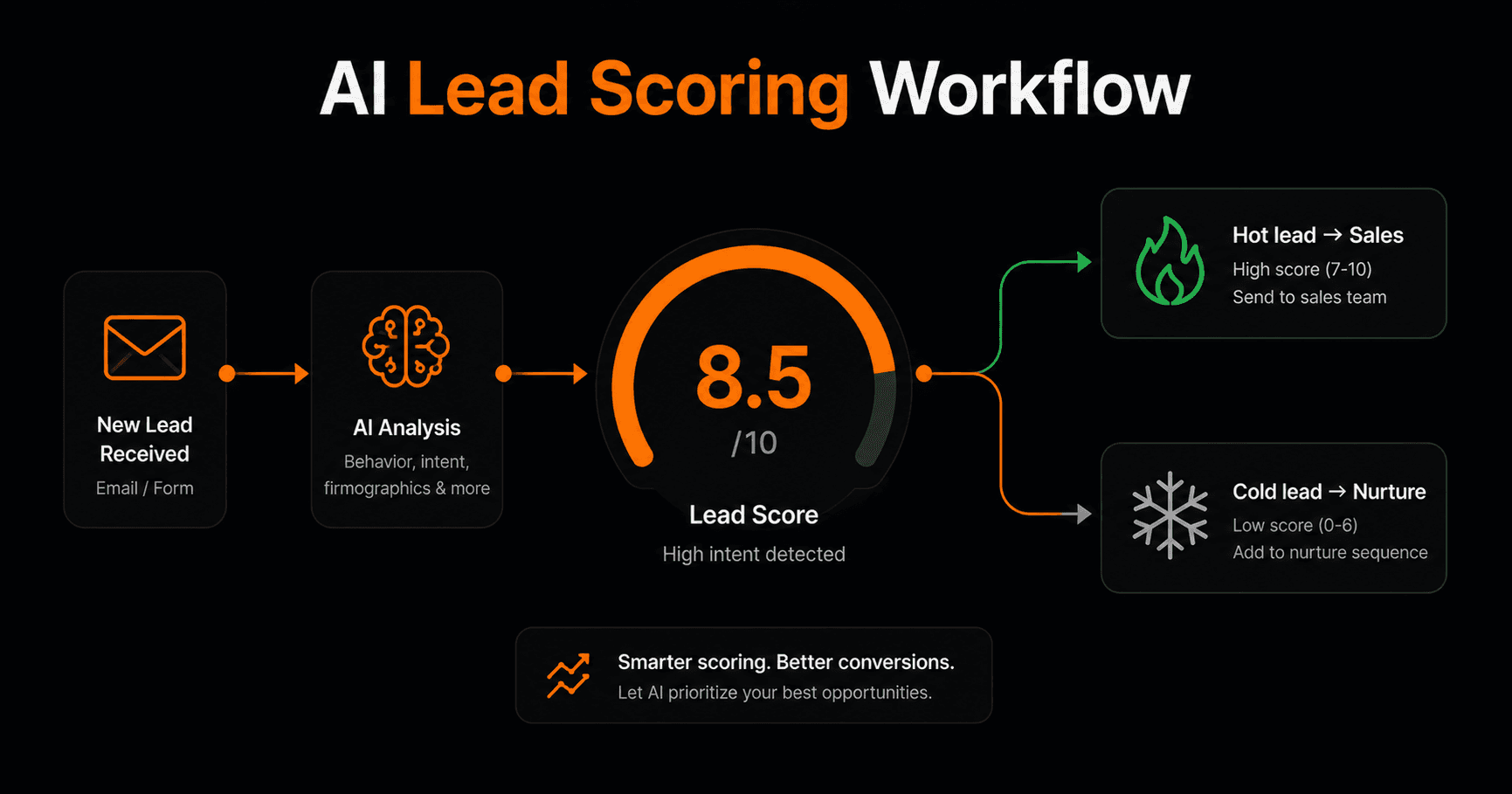
Not all leads are equal — but most businesses treat them that way. Every form submission gets the same follow-up, regardless of whether it's a $50K enterprise prospect or someone just browsing. AI lead scoring changes that: every inbound lead is automatically evaluated, scored, and routed to the right place before your sales team sees it.
What is AI lead scoring?
Traditional lead scoring assigns points based on fixed rules — job title matches, company size, pages visited. It works, but it's rigid. You have to define every rule upfront, and it scores based on profile data, not the actual intent signals in what the lead wrote.
AI lead scoring uses a large language model to read the lead's message, form submission, or email and score it based on actual content — the language they use, the problem they describe, the urgency they signal, the budget they hint at. It scores based on meaning, not just fields.
The result: hot leads get to your sales team instantly. Cold leads go to a nurture sequence. You never manually triage an inbox again.
The workflow — step by step
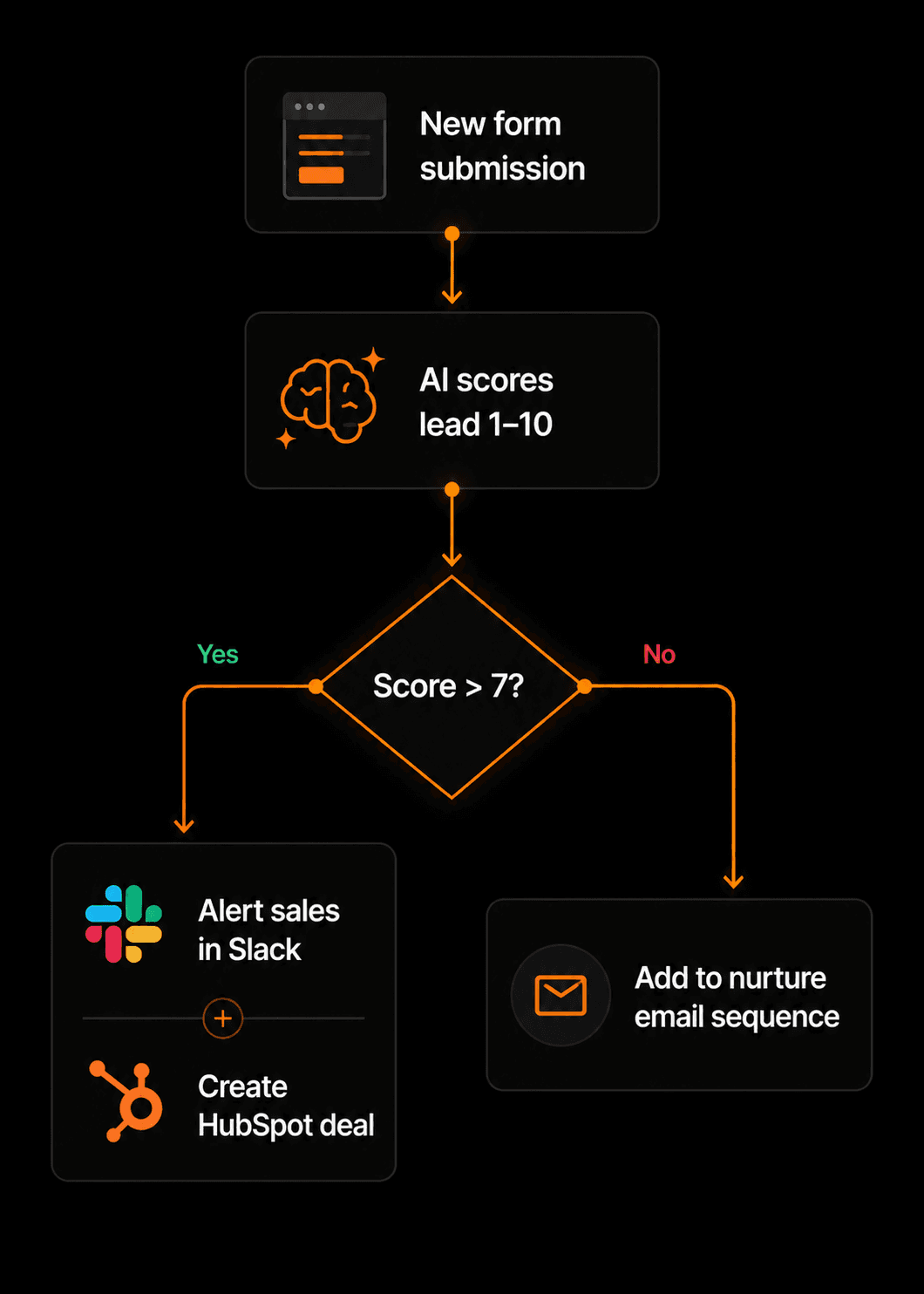
The complete workflow: form → AI score → condition → sales alert or nurture sequence.
- Trigger: new form submission or email. The workflow fires whenever a new lead comes in — a contact form, a webhook from your website, or a new email from an unknown sender.
- AI scoring node. An AI node receives the lead's message and scores it 1–10. The prompt looks something like: “Score this lead 1–10 based on purchase intent, budget signals, urgency, and company fit. Reply with a number only.” The score is stored as an output variable.
- Condition: score > 7? A condition node checks the score. High scores (7–10) go down the hot lead path. Low scores (1–6) go to nurture.
- Hot lead path:Alert sent to #sales in Slack with the lead's name, company, message, and score. New deal created in HubSpot automatically. Optional: personalised intro email sent immediately.
- Cold lead path: Lead added to a nurture email sequence in Mailchimp or ConvertKit. Tag added in HubSpot for future follow-up.
Writing the AI scoring prompt
The quality of your scores depends entirely on the prompt. Here's a template that works well:
You are a lead qualification expert. Score the following lead message from 1 to 10 based on: purchase intent (are they ready to buy?), budget signals (do they mention budget or pricing?), urgency (do they need this soon?), and company fit (are they a business, not a student or researcher?). Reply with a single number from 1 to 10. No explanation.
Lead message: {{trigger.payload.message}}
Adjust the criteria to match your ideal customer profile. If company size matters, add it. If a specific industry is your sweet spot, include that signal.
What the sales team sees in Slack
When a hot lead fires, your team gets a Slack message like this:
🔥 Hot lead — Score: 9/10
Name: Marcus Reid
Company: GrowthStack Inc.
Message: “We need to automate our onboarding flow ASAP. Budget is around $500/month. Can we talk this week?”
HubSpot deal: [link]
Everything the rep needs to respond intelligently is right there. No digging through forms, no switching tabs.
Advanced variations
Three-tier scoring
Instead of a binary hot/cold split, use three tiers: score 8–10 = immediate sales alert, score 5–7 = add to warm nurture sequence, score 1–4 = add to cold list, no follow-up. Use two condition nodes chained together.
AI-generated personalised reply
For hot leads (score > 7), add an AI node that writes a personalised first response based on their message — referencing their specific situation, not a generic template. Send it automatically or route it for human review first via an approval node.
Enrich before scoring
Add an HTTP Request step before the AI node to call a data enrichment API (Clearbit, Hunter, or similar) and pull in company size, industry, and LinkedIn data. Pass all of that to the AI node for a more accurate score.
Results you can expect
Teams that implement AI lead scoring typically see:
- Sales reps spending time only on leads with genuine intent
- Response time to hot leads drops from hours to seconds
- Cold lead nurture sequences that run automatically with zero manual work
- CRM pipeline that reflects actual lead quality, not just volume
Frequently asked questions
How accurate is AI lead scoring?
For well-written prompts on leads with sufficient text (more than a sentence or two), accuracy is typically 85–95% compared to manual expert scoring. Very short leads (“interested, contact me”) score less accurately — you can add a fallback condition for leads under 20 words.
What if the lead scores inconsistently?
Add a temperature setting to your AI prompt and instruct the model to be conservative — “when in doubt, score lower.” You can also use a human approval node for scores between 6–7 so borderline leads get a human review before routing.
Can I score leads from sources other than forms?
Yes — any trigger that delivers a text message works. Email inquiries, LinkedIn DMs via webhook, live chat transcripts, or inbound calls transcribed to text can all feed the same scoring workflow.
How long does the workflow take to run?
From trigger to Slack notification, the entire workflow typically completes in 3–8 seconds. The AI scoring step takes 1–2 seconds on Gemini 2.5 Flash.