Marketing generates more repetitive work than almost any other function. Lead capture, email classification, social monitoring, campaign reporting, follow-up sequences — the list is endless. AI workflow automation can eliminate 10+ hours of this work every week, and in many cases do it better than humans by responding faster, personalizing more accurately, and never missing an action. Here's exactly how.
The marketing tasks that waste the most time
Marketers consistently report spending the most manual time on:
- Moving leads from forms into CRMs (3–5 hours/week for many teams)
- Sorting and responding to email inquiries (2–4 hours/week)
- Compiling campaign performance reports (2–3 hours/week)
- Following up on webinar attendees, content downloads, and trial signups
- Monitoring social media for brand mentions and competitor activity
- Scheduling and sending follow-up email sequences manually
Combined, that's 10–15 hours per week of work that can be fully automated — freeing the marketing team to focus on strategy, creative, and higher-leverage work.
8 marketing automations that save 10+ hours per week
1. Lead capture to email sequence
The manual version: Someone fills out a lead magnet form. You manually export leads from the form tool, import them into your email platform, add them to the right sequence, and update your CRM — a 20-minute process per batch.
The automated version: Form submission triggers an instant workflow: contact created in HubSpot, added to the correct ConvertKit/ActiveCampaign sequence based on what they downloaded, and a Slack notification fired to the marketing team. The first nurture email goes out within 60 seconds of submission.
AI upgrade: An AI node reads the lead's company, role, and form answers to select the most relevant email sequence from multiple options — personalizing beyond what static rules can do.
2. Email classification and routing
The manual version: Your marketing inbox receives a mix of press inquiries, partnership requests, customer questions, and spam. Someone checks it manually and forwards each to the right person.
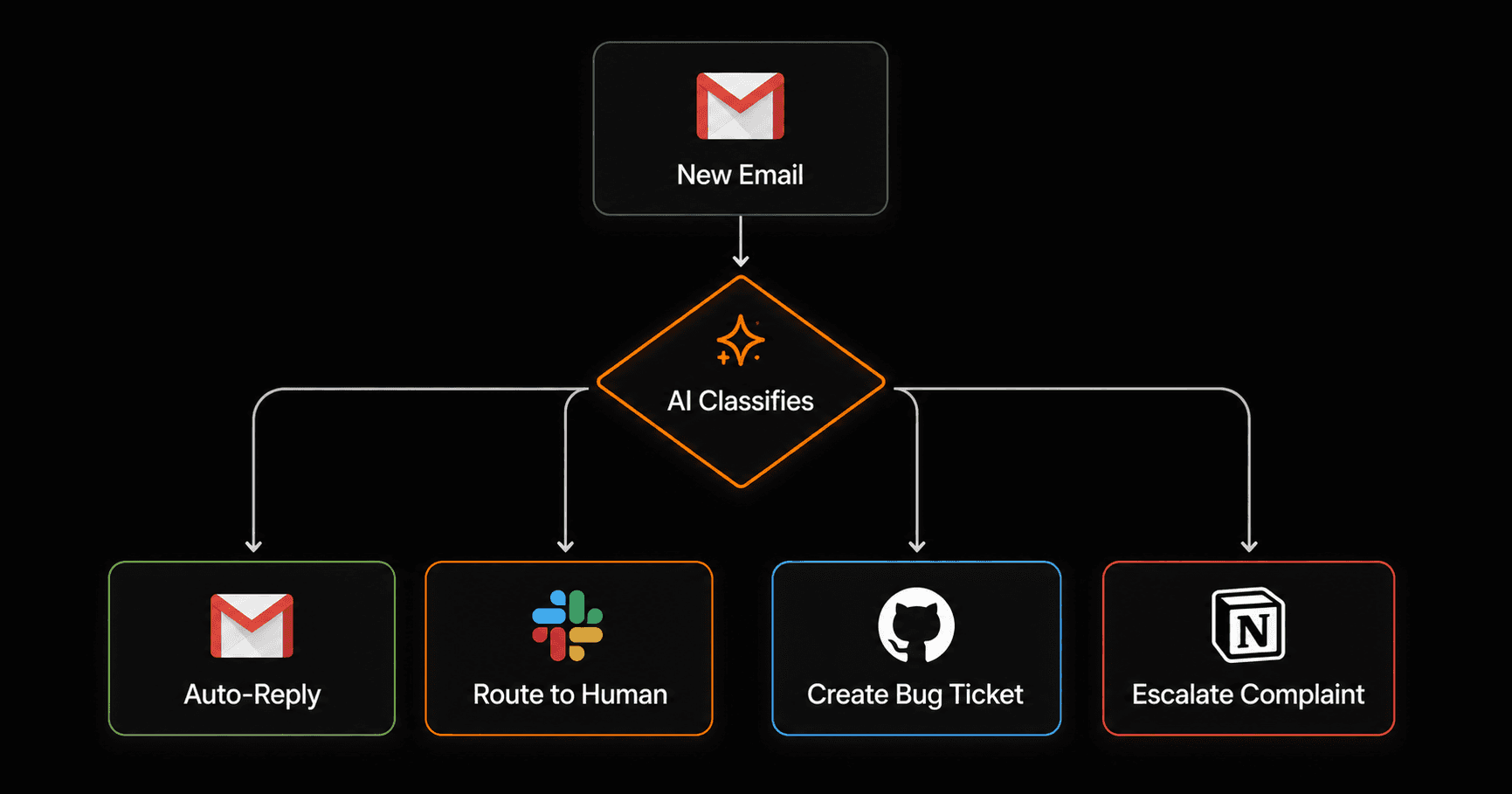
The automated version: Every new email is read by an AI node that classifies intent (press / partnership / customer / spam), drafts a response for routine queries, routes it to the right team member via Slack with a summary, and logs it in Airtable.
AI upgrade: The classification is genuinely intelligent — it reads nuance in the email body, not just keywords. A press inquiry disguised as a customer question gets routed correctly.
3. Social mention to Slack alert
The manual version: Someone checks social media dashboards twice a day looking for brand mentions, competitor activity, and relevant conversations to engage with.
The automated version: Your social monitoring webhook fires whenever a relevant mention is detected. An AI node evaluates sentiment and relevance. High-priority mentions get an immediate Slack DM to the social media manager with a suggested response draft.
AI upgrade: Instead of raw mention alerts (which most tools provide), you get a curated feed: AI filters noise, scores relevance, and drafts responses for the ones worth engaging with.
4. Competitor price change alert
The manual version: Someone checks competitor pricing pages weekly and updates a spreadsheet when they spot changes.
The automated version: A scheduled workflow runs daily, fetches competitor pricing pages via HTTP request, compares them to the previously stored version, and fires a Slack alert with the specific changes highlighted if anything has shifted.
AI upgrade: AI reads the pricing page content and summarizes what changed in plain English — not just “page changed” but “Competitor X added a new $49/mo tier with feature Y.”
5. Campaign performance digest
The manual version: Every Monday morning, someone pulls data from Google Analytics, your email platform, and your ad accounts, formats it into a slide or email, and distributes it to stakeholders.
The automated version: Every Monday at 7am, a Vendarwon Flow workflow fetches metrics from all sources, passes them to an AI node that generates a concise narrative summary, and sends the formatted digest to all stakeholders by email and Slack.
AI upgrade: The AI doesn't just report numbers — it provides commentary: “Email open rates are down 8% week-over-week, likely due to the subject line test on Thursday. Click-through rates held steady.”
6. Webinar follow-up sequence
The manual version: After a webinar, someone manually exports the attendee list, segments by attended vs no-show, sends different follow-up emails to each group, and tags leads in the CRM.
The automated version: Webinar platform webhook fires for each registrant outcome. Attendees get a replay link + CTA email immediately. No-shows get a “you missed it” email with the top 3 takeaways. Both groups are tagged in HubSpot and added to the appropriate nurture track.
AI upgrade: AI personalizes the follow-up based on the registrant's company type and role (startup founder vs enterprise buyer get different CTAs and social proof).
7. Content repurposing
The manual version: A blog post gets published. Someone manually creates 3 LinkedIn posts, a Twitter/X thread, and an email newsletter snippet from it — 2+ hours of work.
The automated version: New blog post published (RSS or webhook) triggers an AI node that reads the post and generates LinkedIn, Twitter, and email versions, all saved to a review Airtable base for approval before scheduling.
AI upgrade: This is impossible without AI — the repurposing itself is the AI task. Rule-based automation can't write content.
8. NPS survey trigger
The manual version: You remember to send NPS surveys occasionally, but it's ad hoc and timing is inconsistent.
The automated version: A workflow monitors for trigger events (30 days since signup, first purchase completed, subscription renewed) and automatically sends an NPS survey email at the optimal moment for each customer. Detractors (score 0–6) get an immediate follow-up from the customer success team.
AI upgrade: AI node reads the customer's usage history and tailors the NPS email subject and body to reference their specific use case, improving response rates significantly.
How AI upgrades each automation vs traditional rules-based tools
Traditional automation tools handle the plumbing — moving data between apps. They can't read unstructured content, generate text, or make judgment calls. AI changes what's possible:
- Classification: Rules can match keywords. AI reads intent and nuance.
- Personalization: Rules send the same message to everyone in a segment. AI adapts the message to each individual's context.
- Generation: Rules can't create content. AI can write emails, summaries, reports, and social posts.
- Decision-making: Rules require every case to be pre-defined. AI handles edge cases intelligently.
Save 10+ hours a week on marketing busywork
Build any of these 8 marketing automations on Vendarwon Flow in under 20 minutes each. Describe what you want — the AI builds it. Free plan available.
Start building →